Github链接
代码已开源,点点❤家人们,顶着一堆作业写的QAQ
https://github.com/SYuan03/llm4db
参考链接
官网
- https://python.langchain.com/v0.1/docs/use_cases/sql/
- https://python.langchain.com/v0.1/docs/use_cases/sql/quickstart/
DashScope(阿里云)API
https://dashscope.console.aliyun.com/dashboard
好多地方都用了gpt-3.5-turbo的模型,4o又太贵,所以体验下Qwen的模型,体验额度还挺大的
Process
以下记录几个问题点
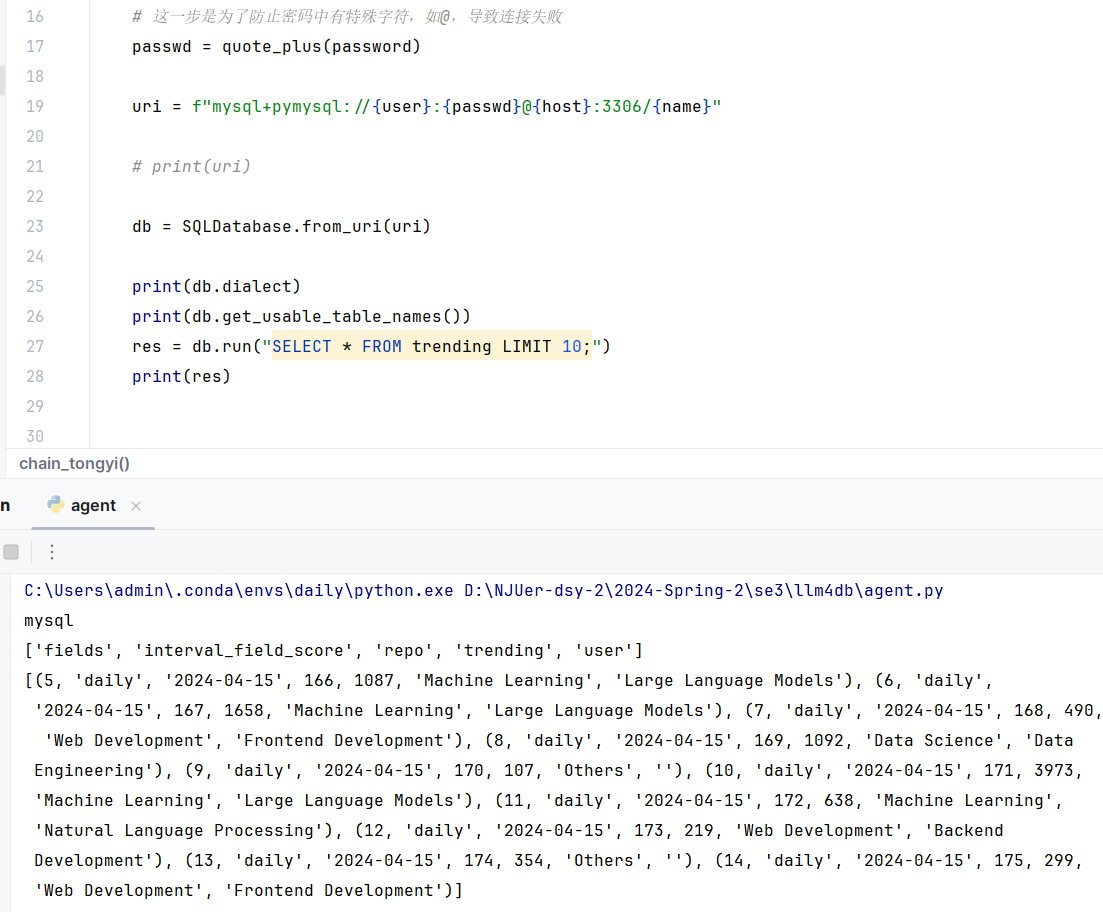
处理密码特殊字符
这步有点气人咳咳
了解到密码中含有@等特殊词汇需要使用
1
| from urllib.parse import quote_plus
|
然后用了发现还是连不上,OK排查了一番后发现填成服务器密码了QAQ
改了之后终于连好了

StrOutputParser
OutputParser that parses LLMResult into the top likely string.
Create a new model by parsing and validating input data from keyword arguments.
Raises ValidationError if the input data cannot be parsed to form a valid model.
demo
1
2
3
4
5
6
7
8
9
10
11
12
13
14
15
16
17
18
19
20
21
22
23
24
25
26
27
28
29
30
| db = SQLDatabase.from_uri(uri)
llm = Tongyi(model='qwen-max-1201', temperature=0)
answer_prompt = PromptTemplate.from_template(
"""
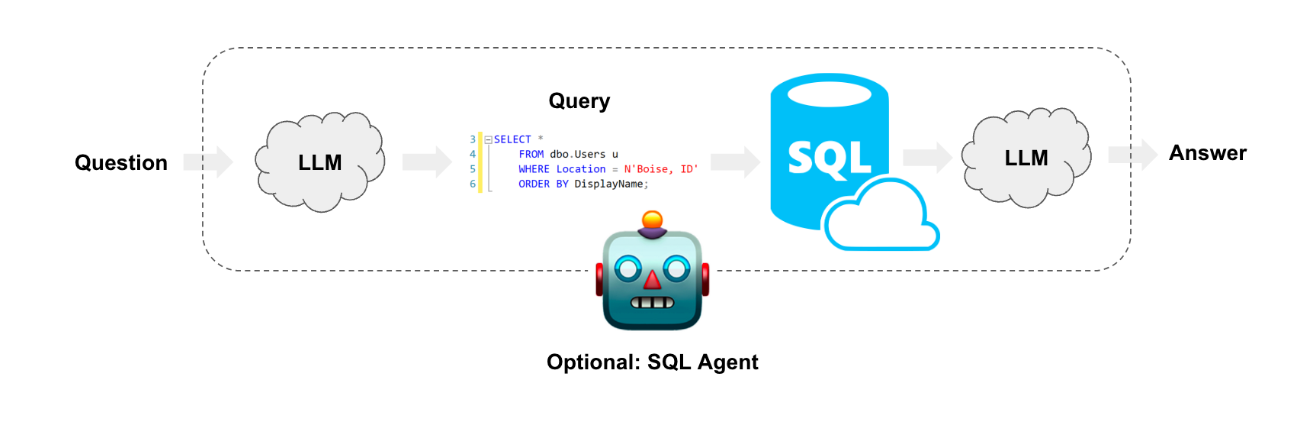
根据以下用户问题、对应的SQL查询以及SQL查询结果,回答用户的问题。
问题: {question}
SQL 查询: {query}
SQL 查询结果: {result}
答案:
"""
)
write_query = create_sql_query_chain(llm, db)
execute_query = QuerySQLDataBaseTool(db=db)
answer = answer_prompt | llm | StrOutputParser()
chain = (
RunnablePassthrough.assign(query=write_query).assign(
result=itemgetter("query") | execute_query
)
| answer
)
res = chain.invoke({"question": "一共有多少仓库?有多少trending?"})
print(res)
|
1
| There are 703 repositories.
|
Cool,验证下
想看下用了多少token的,结果好像数据没刷新
NextSteps
只试了下few shot
Prompting strategies
https://python.langchain.com/v0.1/docs/use_cases/sql/prompting/
看了下可以把表结构也一起传下,增强一下,加点描述之类的
Few-shot examples
https://python.langchain.com/v0.1/docs/use_cases/sql/prompting/#few-shot-examples
还可以搞点few shot
补充:StreamForHttps
部署接口在服务器上的时候发现
http://ip:8000/dbchat/stream能正常流式响应
但是经过nginx反向代理的https的https://ip:8001/dbchat/stream没法正常流式响应,直接~~依大托~~出来
之前的nginx配置如下
1
2
3
4
5
6
7
8
9
10
11
12
13
14
15
16
17
18
19
20
21
22
| server {
listen 8001 ssl;
server_name <ip>;
ssl_certificate /etc/nginx/ssl/certificate.crt;
ssl_certificate_key /etc/nginx/ssl/private.key;
ssl_trusted_certificate /etc/nginx/ssl/ca_bundle.crt;
ssl_protocols TLSv1.2 TLSv1.3;
ssl_prefer_server_ciphers on;
ssl_ciphers "EECDH+AESGCM:EDH+AESGCM:AES256+EECDH:AES256+EDH";
location / {
proxy_pass http://localhost:8000;
proxy_set_header Host $host;
proxy_set_header X-Real-IP $remote_addr;
proxy_set_header X-Forwarded-For $proxy_add_x_forwarded_for;
proxy_set_header X-Forwarded-Proto $scheme;
}
}
|
关闭缓存后修改如下
1
2
3
4
5
6
7
8
9
10
11
12
13
14
15
16
17
18
19
20
21
22
23
24
25
| server {
listen 8001 ssl;
server_name <ip>;
ssl_certificate /etc/nginx/ssl/certificate.crt;
ssl_certificate_key /etc/nginx/ssl/private.key;
ssl_trusted_certificate /etc/nginx/ssl/ca_bundle.crt;
ssl_protocols TLSv1.2 TLSv1.3;
ssl_prefer_server_ciphers on;
ssl_ciphers "EECDH+AESGCM:EDH+AESGCM:AES256+EECDH:AES256+EDH";
location /stream {
proxy_pass http://localhost:8000/stream;
proxy_set_header Host $host;
proxy_set_header X-Real-IP $remote_addr;
proxy_set_header X-Forwarded-For $proxy_add_x_forwarded_for;
proxy_set_header X-Forwarded-Proto $scheme;
proxy_buffering off;
proxy_http_version 1.1;
chunked_transfer_encoding on;
}
}
|
发现解决了问题
致谢
Paying tribute to the legendary software engineering warrior ——SEBugMaker!
And SYuan03 as well. (Ahem, paying tribute to oneself might seem a bit odd)
留言